Package properties
Advanced
Every project package contains it's own set of properties, that can be customized. They are split into two files NameOfPackage.sdpkg and NameOfPackage.csproj.
Editing properties in Game Studio
Game Studio allows you to modify some properties of project packages, but for more advanced features, you will have to manually edit their files.
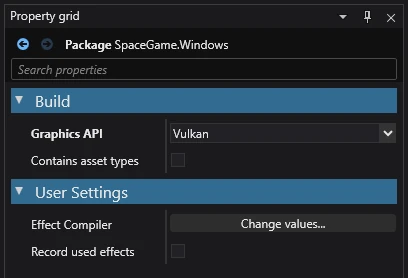
| Property | Description |
|---|---|
| Graphics API | The graphics API the game is built and run with. Default uses the platform default. |
| Contains asset types | Whether this project's assembly defines types used in assets (scripts, components, custom asset types), so the editor and asset compiler load it and packing declares it to consumers. Unset, libraries are loaded and other projects are not. |
| Effect Compiler | Indicates whether effect compile should be allowed, and if yes, should it be done locally (if possible) or remotely. |
| Record used effects | Indicates whether effect compile (local or remote) should be recorded and sent to effect compile server for GameStudio notification. |
Note
Depending on the type of project package, different properties will be displayed
.sdpkg properties
| Property | Description |
|---|---|
| Meta | Package metadata (name, version, authors, etc). |
| AssetFolders | List of directory paths that contain assets. |
| ResourceFolders | List of directory paths that contain resources. |
| OutputGroupDirectories | A dictionary containing a custom output directory for each specified bundle name. |
| ExplicitFolders (currently broken) | List of directory paths that are meant to always be loaded by Game Studio, even if they do not contain any assets. |
| Bundles | List of bundles and their metadata. For more information read Asset Bundles. |
| TemplateFolders | List of directory paths containing custom templates in the .sdtpl format. For more information read Custom Assets. |
| RootAssets | List of root assets (assets that will always be included with the build). |
| AssetAssemblies | A list of paths to external assemblies (.dll files) containing custom assets. |
Here is an example .sdpkg file for the project package "MyGame.Game" that has two asset folders "Assets" and "Effects" and a single resource folder "Resources".
!Package
SerializedVersion: {Assets: 3.1.0.0}
Meta:
    Name: MyGame.Game
    Version: 1.0.0
    Authors: []
    Owners: []
    Dependencies: null
AssetFolders:
    - Path: !dir Assets
    - Path: !dir Effects
ResourceFolders:
    - !dir Resources
OutputGroupDirectories: {}
ExplicitFolders: []
Bundles: []
TemplateFolders: []
RootAssets: []