Manage versions
Beginner
Different versions of the engine can be managed using the Stride Launcher.
Note
The instructions provided here can be used as a general guide for updating to any new version of Stride.
Versioning scheme
Versions follow the formula major.minor.patch.
Changing the version
You can select a different version of the engine by clicking on one under Stride versions.
To change the patch number of a version (the last part in a version string), click the dropdown menu next to it.
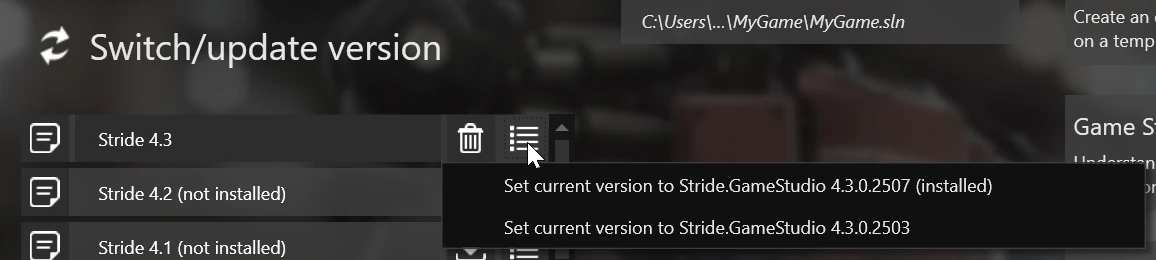
Installing a version
To install a specific version of the engine:
- Select the version you want to install (see changing the version).
- Press the install button.

Uninstalling a version
To remove a specific installed version of the engine:
- Select the version you want to get rid of (see changing the version).
- Click the uninstall button.

Managing versions with Stride CLI
The Stride CLI let's you install, uninstall and update versions of the engine directly through the command line. For steps on how to install it, read Stride CLI.
stride sdk available --prerelease # List all available versions, including betas
stride sdk install # Install the latest version
stride sdk update # Update all installed versions to the latest patch.
stride sdk uninstall 4.3 # Unintall Stride 4.3
| Command | Description |
|---|---|
stride sdk install |
Install the latest version of the engine or the resolved project's version located in the current directory. |
stride sdk install VERSION |
Install a specific version of the engine. Version patch number is optional. |
stride sdk available |
List available versions of the engine. |
stride sdk list |
List all installed versions. |
stride sdk update |
Update all installed versions of the engine to the latest patch. |
stride sdk update VERSION |
Update a specific installed version of the engine to the latest patch. Version patch number is optional. |
stride sdk uninstall VERSION |
Uninstall a specific version of the engine. |
Note
For many commands, the patch version can be skipped (e.g. 4.3).
Tip
The CLI will ignore beta versions of the engine, unless you pass the --prerelease flag.