Stride 4.2 release notes
February 6th, 2024
Stride contributors are thrilled to announce the release of Stride 4.2, now fully compatible with .NET 8 and leveraging the latest enhancements in C# 12. This release brings significant improvements in performance, stability, and developer experience.
Read the full blog post here: Announcing Stride 4.2
A massive thank you to the open-source Stride community for your dedicated contributions. This release saw over 75 contributions from more than 22 amazing contributors, each playing a crucial role in making Stride 4.2 a reality.
Other releases since the last major release
- 4.2.1.2485: October 2025
- 4.2.1.2442: August 2025
- 4.2.0.2381: March 2025
- 4.2.0.2374: February 2025
- 4.2.0.2293: January 2025
- 4.2.0.2282: December 2024
- 4.2.0.2232: September 2024
- 4.2.0.2188: June 2024
- 4.2.0.2122: March 2024
What's new
Stride 4.2 includes numerous enhancements and improvements. Here’s what to expect:
.NET 8 Integration: Stride 4.2 is now fully aligned with .NET 8, harnessing its performance improvements and efficiency gains for game development. This means faster execution times, reduced memory footprint, and access to the latest C# features, making your development smoother and more efficient. Learn more
C# 12 Features: With C# 12, Stride users can write cleaner, more concise code thanks to new language features. These improvements reduce boilerplate and enhance readability. Discover C# 12
Changed Assimp Binding to Silk.Net.Assimp: This update transitions the asset compiler's binding from C++/CLR to Silk.Net.Assimp, a move that not only simplifies the codebase but also paves the way for asset compilation on non-Windows systems, broadening Stride's accessibility. See the pull request
Migration NET6+ and More gettextnet#2: Stride's commitment to staying current with .NET versions continues, ensuring compatibility and leveraging the stability and features of the latest .NET environment across all aspects of the engine. Check out the update
Enable Multiple Profiler Consumers and Add a Timeline/Tracing Profiler: This enhancement introduces a profiler with chrome://tracing output format, significantly improving the debugging and performance tuning process by allowing for a more granular analysis of game performance. Explore the feature
Feature: Add Support for F# and VB Project Types: Stride now welcomes developers using F# and Visual Basic, offering support for code-only projects in these languages. This opens up Stride to a broader audience. Learn about F# and VB support
Stride Diagnostics Analyzer: This new tool provides immediate feedback within your IDE, identifying potential compatibility issues with Stride's serialization system. It's about making your development process smoother and helping you catch and resolve issues faster. Discover how it works, the docs page and here is the pull request.
OpenVR Handle Custom Resolution Specified by the User Through VR Settings: Enhancing VR development, this update allows developers to specify custom resolutions for VR projects, optimizing performance and visual quality for various VR devices. See the details
Editor Enhancements:
Dynamic Snapping for Selected Objects: This feature introduces dynamic snapping while transforming objects, improving precision and workflow efficiency within the Stride Editor. Dynamic snapping PR
Animation Stack Selection for FBX Imports: Stride now allows you to select specific animations from a stack when importing FBX files, giving you more control over the assets you bring into your projects. Learn more
Automatic Asset Copying to Resources Directory: To streamline asset management, the editor can now automatically copy imported assets to the project's Resources directory, ensuring your assets are always where they need to be. See how it works
Changelog
For the detailed list of changes, see the Stride 4.2.0.2122 release on GitHub and the other releases listed above.
Contributors
A heartfelt thank you to all the contributors who have played a significant role in this release:
- @MeharDT
- @Basewq
- @Doprez
- @IXLLEGACYIXL
- @SVNMLR
- @VaclavElias
- @acastrodev
- @Ethereal77
- @adrsch
- @Jklawreszuk
- @Eideren
- @Fydar
- @froce
- @Kryptos-FR
- @Schossi
- @MaximilianEmel
- @ch3mbot
- @tebjan
- @JeromyWalsh
- @azeno
- @WojciechNagorski
- @manio143
New contributors
We are especially excited to welcome the following new contributors to Stride with the 4.2 release. Your contributions are greatly appreciated!
- @adrsch made their first contribution in https://github.com/stride3d/stride/pull/1920
- @froce made their first contribution in https://github.com/stride3d/stride/pull/1788
- @Fydar made their first contribution in https://github.com/stride3d/stride/pull/1941
- @WojciechNagorski made their first contribution in https://github.com/stride3d/stride/pull/1951
- @Schossi made their first contribution in https://github.com/stride3d/stride/pull/1811
- @MaximilianEmel made their first contribution in https://github.com/stride3d/stride/pull/1956
- @ch3mbot made their first contribution in https://github.com/stride3d/stride/pull/1769
Stride 4.2 Feature Overview
F# and Visual Basic Integration
A pivotal PR has enabled F# and Visual Basic support for game development in Stride. This feature is currently limited to a code-only approach. Detailed insights and tutorials will be provided in upcoming blog posts.
We will use the Stride Community Toolkit [WIP], with further details to be covered in a separate post.
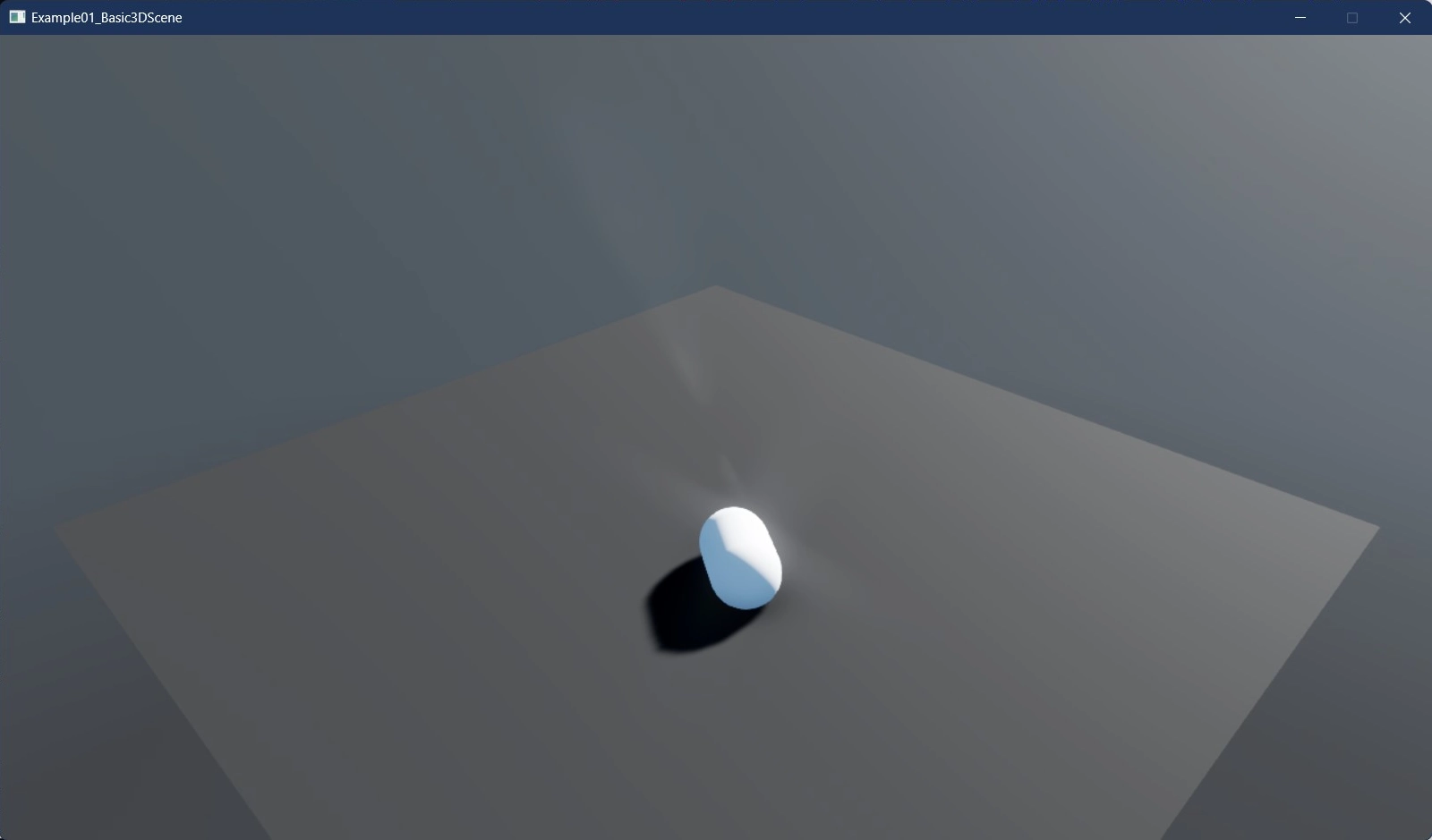
Below is a simple example of rendering a capsule using F#:
open Stride.CommunityToolkit.Engine;
open Stride.CommunityToolkit.ProceduralModels;
open Stride.Core.Mathematics;
open Stride.Engine;

let game = new Game()

let Start rootScene =
    game.SetupBase3DScene()
    game.AddProfiler() |> ignore

    let firstBox = game.CreatePrimitive(PrimitiveModelType.Capsule);
    firstBox.Transform.Position <- new Vector3(0f, 2.5f, 0f)
    firstBox.Scene <- rootScene

[<EntryPoint>]
let main argv =
    game.Run(start = Start)
    0
The equivalent Visual Basic example:
Imports Stride.CommunityToolkit.Engine
Imports Stride.CommunityToolkit.ProceduralModels
Imports Stride.Core.Mathematics
Imports Stride.Engine

Module Program
    Private game As New Game()

    Sub Main()
        GameExtensions.Run(game, Nothing, AddressOf StartGame)
    End Sub

    Private Sub StartGame(rootScene As Scene)
        game.SetupBase3DScene()
        game.AddProfiler()

        Dim entity = game.CreatePrimitive(PrimitiveModelType.Capsule)
        entity.Transform.Position = New Vector3(0, 8, 0)
        entity.Scene = rootScene
    End Sub
End Module
These examples showcase how F# and Visual Basic can be utilized in Stride. The Stride Community Toolkit provides a set of helpers and extensions designed to enhance your experience with the Stride Game Engine.
Fixes
Although there have been many fixes, we'd like to point some of them out:
- Runtime rasterized fonts are broken #1750
- Game Studio doesn't reload sub projects after changes #1703
- Changing the comparison project related and not UPath related #1704
- Translations fix #1717
- C# Beginner Tutorial Build Errors #1652
- Can not create "C# Beginner" project #1650
Also good to know
Although not directly tied to Release 4.2, we have some more big things going on.
For instance to our website and documentation. We also had another community meeting to address all those new members.
- Website and documentation revamped and build process updated
- Contributor section moved to docs
- Community meeting October 2023
Acknowledgements
We extend our heartfelt gratitude for all the hard work and donations we have received. Your generous contributions significantly aid in the continuous development and enhancement of the Stride community and projects. Thank you for your support and belief in our collective efforts.